Windows cmd代理
临时设置
在CMD里执行
v2
使用sock5代理
set http_proxy=socks5://127.0.0.1:10808
set https_proxy=socks5://127.0.0.1:10808
使用http代理
set https_proxy=http://127.0.0.1:10809ss
set http_proxy=http://127.0.0.1:1080
set https_proxy=http://127.0.0.1:1080
取消
set http_proxy=
set https_proxy=
为git设置代理
v2
git config --global http.proxy http://127.0.0.1:10808
git config --global https.proxy http://127.0.0.1:10808
ss
git config --global http.proxy http://127.0.0.1:1080
git config --global https.proxy http://127.0.0.1:1080
PowerShell 的:
$env:http_proxy="http://127.0.0.1:1080"
$env:https_proxy="http://127.0.0.1:1080"
长期设置
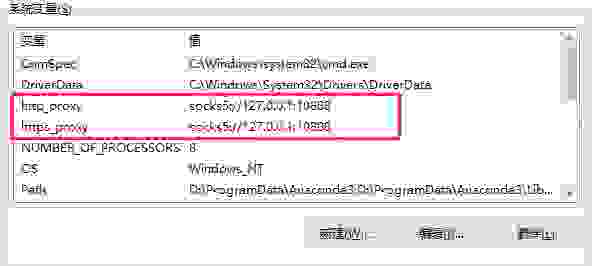
为了每次打开cmd,cmd都使用代理,那么,可以通过设置系统环境变量的方式,进行设置。右键 我的电脑 -> 属性 -> 高级系统设置 -> 高级 -> 环境变量 ,然后在 系统环境 中,新建两个系统环境变量,变量名称分别为 https_proxy 和 http_proxy ,值为 https_proxy=socks5://127.0.0.1:10808 :
参考:
https://www.cnblogs.com/pengpengboshi/p/17188143.html
https://zhul.in/2020/03/03/set-proxy-for-cmd-under-windows/
https://gist.github.com/dreamlu/cf7cbc0b8329ac145fa44342d6a1c01d